Doing Business with Northrop Grumman

Express Interest in Becoming a Northrop Grumman Supplier

If you are interested in doing business with Northrop Grumman, please complete the following steps:

  1. Review the Northrop Grumman website to become familiar with Northrop Grumman's product lines to determine which business units or programs you would like to market. Review the subpages on this site to become familiar with our business practices (GSC LeadershipPayment and InvoicingCollaborate with Northrop GrummanWhat We Buy; and Standards of Business Conduct).
  2. Complete the Supplier Information Form. This form begins the supplier review process and allows us to route your information to the correct business unit. When this form is successfully submitted, you will receive confirmation of receipt of your information.
  3. If there is an interest in pursuing a business relationship with your company, you will receive an invitation to register on the SAP Ariba Network. Please be advised that you may be asked to complete additional forms to satisfy unique requirements.

 Note: Northrop Grumman is committed to ensuring that capable businesses of all types receive meaningful subcontracting opportunities with Northrop Grumman. Potential small business suppliers should contact the Office of Small Business Programs to connect with a Northrop Grumman Small Business Liaison Officer (SBLO). 

Register as a Northrop Grumman Supplier

Northrop Grumman has partnered with SAP Ariba to manage our Supplier Registration process using the SAP Ariba Network. All steps outlined below must be completed to register as a Northrop Grumman supplier. 
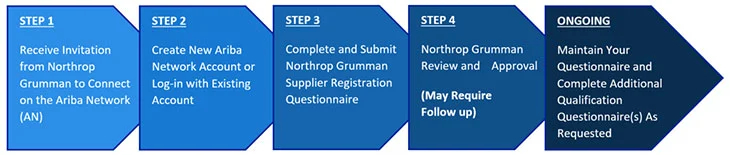
  1. Receive Invitation from Northrop Grumman to Connect on the Ariba Network (AN)
  2. Create New Ariba Network Account or Log-in with Existing Account
  3. Complete and Submit Registration Questionnaire
  4. Northrop Grumman Review and Approval (May Require Follow Up)
  5. Maintain Your Questionnaire and Complete Additional Qualification Questionnaire As Requested

View the Northrop Grumman Supplier Registration Guide

This guide provides detailed instructions for completing Steps 1-4, as well as supports ongoing information updates to your
Ariba Network supplier account.

Note: Registering for an Ariba Network account does not mean you are registered as a supplier with Northrop Grumman.
You will need to complete Northrop Grumman's Registration Questionnaire and it will need to be approved before you are
considered registered with Northrop Grumman.
Become an Authenticated OASIS Account Holder

Become an Authenticated OASIS Account Holder

The Northrop Grumman Online Automated Supplier Information System (OASIS) consists of a suite of tools our suppliers utilize when conducting business
with Northrop Grumman. Registered suppliers can access these OASIS tools in the public domain, but the NG OASIS Dashboard and password-protected
OASIS tools can only be accessed after further authentication. This optional process enables a supplier to become an OASIS Account Holder.

Note: OASIS Account Holder onboarding entails an entirely separate process from supplier registration. A supplier can only become an OASIS
Account Holder after completing the NG supplier registration process.


If you are a registered NG supplier and would like to gain access to the OASIS Dashboard and additional tools, please view NG OASIS Account Onboarding and FAQ.

Once a registered NG supplier has become an OASIS account holder, they can log on to the OASIS Dashboard.

Why Become an OASIS Account Holder?

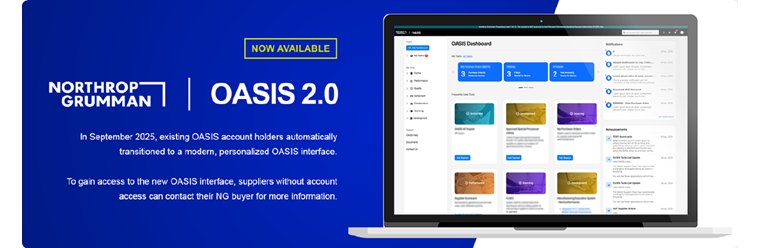
Launched in September 2025, the OASIS 2.0 Dashboard offers numerous features that enable effective collaboration between NG and suppliers.

OASIS 2.0

Key Features

  • Authenticated and access- controlled views of program-provisioned tool activity
  • Notifications of new activity, increasing awareness and efficiency
  • Enhanced supplier information validation tools for the annual SACC renewal
  • AP Inquire supplier invoice and payment self- lookup tool
  • My Task SAP Procurement tasking visibility
Northrop Grumman will continue to modernize the OASIS Dashboard and add new features that meet our suppliers' needs. We specifically created
AP Inquire - a self-service invoice and payment lookup tool - in response to our suppliers' desire to locate these materials without submitting
support tickets. Only OASIS Account Holders can access AP Inquire.

Resources for OASIS Account Holders

Lost or forgot your token? Have questions about Foreign National applications? Curious about our Security and Identity Management practices?

Please find answers to these questions and additional information in NG OASIS Account Onboarding and FAQ.

If you have questions that are not answered in that document, you can contact OASISsupport@ngc.com
Note: This mailbox only supports registered suppliers onboarding to OASIS and current OASIS account holders.